Showing posts with label Cloud Computing. Show all posts

Saturday, 31 October 2020

Xen Virtualization and Cloud Computing #05: The Xen Project, Unikernels, and the Future

LPI Exam Prep, LPI Tutorials and Material, LPI Study Material, LPI Guides

Previous articles in this series introduced virtualization, described how Xen achieves it through its architecture and key features, and described other platforms with which Xen interacts. This article wraps up the series by describing some exciting advances in virtualization and how Xen supports them.

As we’ve seen, a hypervisor loads a VM that holds a complete operating system such as GNU/Linux, Windows, or BSD. The VM must be complex and large because it is essentially a whole computer system. By default, the operating system in a VM supports a wide range of hardware from many vendors with different design and drivers. These regular operating systems are also multi-user, multi-process, and multi-purpose, adding to their size.

To run an application without the bulk of extra software it doesn’t need, the concept of a unikernel was developed. A unikernel is single-purpose (usually) and is created to run in a VM or container instead of directly on hardware, so it is free of the complexity of device drivers. A unikernel is not multi-user or multi-process, but just creates a single thread of code that runs one application. It can be compiled with just the libraries it needs. Therefore, a unikernel is small, lightweight, and quick to load and run. But  it runs only in a VM or container.

LPI Exam Prep, LPI Tutorials and Material, LPI Study Material, LPI Guides
In a  very broad sense, a unikernel reproduces the simple execution environment of mainframes in the era before multi-user operating systems. It is also reminiscent of two projects from the late 1990s, MIT’s Exokernel and Nemesis, which was developed by Citrix along with several universities.

Basic architecture of a unikernel

A unikernel generates a singular runtime environment that lacks a shell, can’t spawn subprocesses, and can’t create multiple threads. Developers select the minimal set of libraries that required for their application to run. These libraries are then compiled with the application and make an executable image (the unikernel) that can be executed directly on a hypervisor without a complete operating system such as GNU/Linux or Windows OS. The unikernel is considered a VM from the point of view of the hypervisor. You can also think of a unikernel as a pure runtime for programming languages. Unikernels exist for Ocaml, Erlang, Java, Haskell, Rust, Ruby, Go, an other languages.

The Xen Project is a leader in the birth of Unikernels. This technology has perhaps become the core of a new form of cloud computing, where a hypervisor can support many VMs.

Figure 7 shows  the components required to run a unikernel.

LPI Exam Prep, LPI Tutorials and Material, LPI Study Material, LPI Guides

Figure 7. Architecture for running a unikernel

I explained earlier that the advantage of containers is their speed and small size. These features were notable reasons for using containers before the  advent of unikernels. In fact, unikernels tend to beat the containers for speed and size. They also have excellent security because they contain no extra components where vulnerabilities might lurk. Boot times are nearly instantaneous.

From the features just listed, security is the most important. The unikernels, because of the lack of functions that a standard operating system provides, have a smaller attack surface. There are no shells, no utilities, and no other programs that an intruder can exploit to gain access to the system.

Most unikernels compile into applications, each of which has a unique footprint because of its unique combination of code and library functions. Thus, even if an intruder finds an attack vector into a unikernel, it won’t work with  other unikernels.

Figure 8 shows the components of a standard Linux kernel. A unikernel removes the traditional operating system layers, leaving only the minimal necessary system libraries, the programming language runtime, and the application code itself.

LPI Exam Prep, LPI Tutorials and Material, LPI Study Material, LPI Guides

Figure 8. Typical operating system components

The Xen Project as a leader provides a number of capabilities to Unikernel lovers. I will examine some of them here.

As said before, unikernels focus on small and fast packages. In Paravirtualization (PV), Xen Project can give access to the underlying hardware layer to Unikernels. But the hypervisor still contains the actual drivers for the hardware, so they don’t have to be re-implemented in the unikernels. However, unikernels are free to use HVM mode and implement actual hardware drivers.

The security is in the Xen Project hypervisor DNA and it means the smaller attack surface. This feature is in line with Unikernels.

Performance and security are very important for both the Xen Project and unikernels. The bare-metal structure of the Xen hypervisor provides a good platform for many unikernel VMs on a single host.

Some unikernel projects include:

◉ MirageOS
◉ HaLVM
◉ ClickOS
◉ Clive
◉ Drawbridge
◉ LING
◉ UniK
◉ Osv
◉ Rumprun
◉ HermitCore

Unikraft: a new development process for unikernels


With all good features unikernels offer, they have some drawbacks. Unikernels force developers to port applications manually to the underlying minimalistic OS and custom-build the list oflibraries used. Think about a big project like Apache, MariaDB, or Suricata-IDS. As you can guess, this requires a lot of effort by experts and considerable amount of time. What is the solution? Do these developers have to sacrifice the high performance of unikernels and stick to a standard OS?

The goal of the Unikraft project is to solve this problem and provide a highly configurable unikernel code base. Another goal is to encourage developers to supply their code in libraries rather than working on independent projects. Unikraft is hoping to create a community around minimalistic OSes and provide a tool that can automatically build this kind of operating systems.

Already, a small operating system kernel called Mini-OS is included with the Xen hypervisor. It is the root of many unikernel projects because it has the kernel drivers for the Xen hypervisor. But the Unikraft project’s goals differ from those of Mini-OS.

Unikraft is at an early stage. According to the NEC Lab, the its anticipated features are:

◉ Fast boot and migration time
◉ Low memory footprint
◉ Strong security
◉ High density
◉ High performance
◉ Developer-friendly tools and processes
◉ Ability to run on all major platforms

At the time of writing this article, the Unikraft projects are:

◉ LightVM
◉ Jitsu
◉ ClickOS
◉ Elastic CDNs

LightVM

LightVM is a virtualization solution based on Xen that offers fast boot-times for VMs even when hosting a large number of them. LightVM does this by replacing the Xenstore configuration database with a new distributed solution called NoXS (no Xenstore). NoXS reduces the speed of accessing the database by providing a shared page for each device that contains all the information needed for device initialization. LightVM also using the new Chaos toolstack that does operations like instantiation, migration, saving, and restoring. Currently, LightVM relies on the Linux kernel for Dom0, but for DomU it can use both Linux and Mini-OS based guests. LightVM can boot a VM in 2.3ms, which is twice as fast as Docker. With LightVM you can say, “My VM is both lighter and safer than your Container.”

MirageOS

MirageOS is a library providing operating system functionality. It is used to create Unikernels that provide secure, high-performance network applications for cloud computing and mobile platforms. The main programming language for MirageOS is Ocaml, a high-level programming language with optional functional and object-oriented features, able to create secure and high-performance programs. You can develop your program on your PC by Ocaml and then compile it into a fully-standalone program for Unikernel. There are now more than 100 MirageOS libraries, and MirageOS offers a lot of low-level implementations of the most common protocols, such as TCP/IP, UDP, IPV6, UDPV6, ICMP, DNS, SSH, VNC, HTTP, XMPP,  and the Xen Device Drivers. MirageOS help you run your servers more cheaply, securely, and faster in any Xen based cloud.

Other aspects of the Xen Project and its future


The Xen Project is always working to support new hardware and technologies. Some of its current efforts are targettng AMD EPYC CPUs, the Hygon Dhyana 18h processor family, the Raspberry Pi4, and Intel’s AVX512.

If you believe that open source changed the world of software, you should look forward to what RISC-V, pronounced “Risk-Five,” could do for the world of microprocessors. RISC-V is based on the RISC (Reduced Instruction Set Computer) principle. It is too soon to judge the future of RISC-V. At the time of writing this article, RISC-V had some logistical problems, including a lack of a certification process, no standardization for part families or packaging, and no plug-and-play at any point of the hardware or software stacks.  Some operating systems, including GNU/Linux and FreeBSD, are being ported to RISC-V architecture. The Xen Project is working on a port too.

The embedded and automotive areas provide good news about the Xen Project too. Several companies, including EPAM, Xilinx, and GlobalLogic are working on Xen for embedded devices in order to change the world of vehicles.

All vehicles nowadays rely on computers, and they usually now control most parts of a car. Some of these parts are sensitive, and security is a big concern in this area. Components such as engine control, autonomous driving, networks, warning lights, speed display, and the fuel tank are vital and must be protected. 

Nowadays, most cars use variants of Android, but this OS is not fast and secure enough for such a purpose. More important, some of the car options need an Internet connection, which opens a door for attacks. If an attacker penetrates the car’s computer, they can play with the lives of the driver and others.

The Xen Project provides good security and performance. With a car computer running a Xen hypervisor, the car operating system can launch in the millisecond and Xen can provide a good security by isolation. In these cars, the operating system runs as a DomU under the control of the Xen hypervisor. For more information about this field, you can read “Automotive Virtualization by Xen” on the EPAM company website and “Virtual Open Systems: Automotive mixed-critical virtualization done right” on the Arm company website.

The Xen Project is active in the unikernel area, working to support new technologies and hardware.

Read the previous post


Source: lpi.org

Tuesday, 27 October 2020

Xen Virtualization and Cloud Computing #04: Containers, OpenStack, and Other Related Platforms

LPI Exam Prep, LPI Tutorial and Material, LPI Learning, LPI Certification, LPI Prep

Previous articles in this series introduced virtualization, discussed how Xen’s architecture provides it, and covered interesting Xen features. This article looks at some other platforms with which Xen interacts: containers and OpenStack.

Virtualization, containers—or both?

Containers are a mechanism for isolating processes, similar to virtualization. With Docker and Kubernetes, containers have became popular over the past decade and are considered by some people to be competition for virtualization. So I’ll discuss the relationship briefly.

Container technology was born in 1979 with Unix version 7 and its chroot feature. A command called chroot, which stands for “change root directory,” isolates a process and restricts its access to a specific directory. For instance, if you change a process’s root to /tmp/local23, and the process tries to run /usr/bin/python3, it will actually run /tmp/local23/usr/bin/python3.

LPI Exam Prep, LPI Tutorial and Material, LPI Learning, LPI Certification, LPI Prep
This technology was hard to use and didn’t seem to have much application, so it was mostly forgotten. But in 2000s, the idea became more popular with the introduction of FreeBSD Jails. This mechanism partitions a FreeBSD into several independent mini-systems that share the same kernel. Sun Microsystems entered the container era in 2004 with Solaris Containers (also called Solaris Zones), which combined system resource controls with boundary separation.

In 2001, this jail system was introduced into Linux with Linux Vserver, and in 2005, with OpenVZ, this technology was added to the Linux kernel.  In 2006, Linux introduced control groups (cgroups) with accounts, resource limits, and isolation of resources such as CPU and memory. Two Google engineers, Paul Menage and Rohit Seth, extended the concept with a mechanism called “process containers.” Finally, in 2008, LXC (Linux Containers) was introduced as virtualization at the operating system level. The reliability and stability of LXC persuaded developers to build other container technologies on it. The first of these was Warden in 2011, superseded by Docker in 2013.

Docker was a revolution in container technology. It offers a GUI interface and is easy to use. After Docker, another technology with the name rkt (pronounced Rocket) tried to improve on some of the gaps in Docker.

Basically, container technology is a method of packaging an application so it can run with isolated dependencies. Whereas virtual machines run their own kernels and look like complete computer systems, containers run individual processes and share the host OS through the help of container engine. Containers are lightweight and deploying them is now fast and easy. They are highly suitable for short-term applications, and when the users’ biggest priority is to run the maximum number of applications on a minimal number of servers.

Figure 5 compares containers and virtualization.

LPI Exam Prep, LPI Tutorial and Material, LPI Learning, LPI Certification, LPI Prep

Figure 5. Architecture of virtualization and containers

Despite the benefits of the containers, they also have disadvantages. I’ll mention some here:

◉ All containers on a host must be built to run on the same OS. If you want a container with a different OS, you need a different host machine. With some tricks, though, it’s possible to support applications from different OS. For example, brandZ (which stands for “branded zone”), from Oracle Solaris, added support for the Linux system call interface into the Solaris kernel so it can run native Linux applications. Such workarounds have limitations.

◉ As said earlier, the OS is shared, so any security hole in the OS kernel affects all containers on the host.

◉ If the application need the full functionality of a dedicated operating system, it can’t run in a container.

◉ Containers aren’t suitable for applications that need to be used for an extended period of time.

The sudden ascendance of Docker unfortunately led some people to think that containers are a new technology, and even worse, that containers are a superior replacement for virtualization. As time passed, most understand that these are different technologies with separate reasons for use. In some cases, a combination of these technologies is useful. We’ve seen uses for a single container inside a virtual machine, multiple containers inside a virtual machine, and even a virtual machine inside of a container.

The Xen Project and OpenStack


As we have seen, the Xen Project is the engine behind many cloud companies. Without it, some projects like AWS wouldn’t have been possible. Rackspace is one of the major companies that use Xen. In October 2010, with the help of NASA, Rackspace  started a project with the name OpenStack that became to the one of the most successful cloud platforms in the world. By now, more than 500 companies have joined this project.

The goal of the OpenStack project is to provide an open source cloud computing platform that is easy to implement, but highly scalable and can meet the needs of public and private clouds of any size. OpenStack provides a modular cloud infrastructure that runs on standard hardware, along with an enormous set of tools for management and orchestration. OpenStack is kind of virtualization management platform that sit on top of the virtualized resources and helps you to automate processes. You can use the virtual resources to run a combination of tools: for instance,  configure a network, create pooled resources, put up a user interface, etc.

The Xen Project supports OpenStack Through a toolstack called XAPI, Xen exposes an API called XenAPI to control the hypervisor.  OpenStack has a XenAPI driver to control XAPI, so all XenAPI managed servers could be used with OpenStack. XAPI is the preferred mechanism for supporting Citrix Hypervisor (XenServer).

Xen is integrated with OpenStack via the standard libvirt API for managing virtualization platforms. With Xen, the minimum level of libvirt you should use is 1.2.9.

Read the previous post


Source: lpi.org

Saturday, 17 October 2020

Xen Virtualization and Cloud Computing #03: Key Features of Xen

LPI Exam Prep, LPI Tutorial and Material, LPI Guides, LPI Prep, LPI Certification

The previous articles in this series introduced virtualization and showed how Xen is designed to provide it efficiently. Here we’ll delve into some interesting features and their importance. A larger list can be found at the appropriate project page on features. At time of writing this article, the most recent version of Xen Project is 4.13.

Security-related features

The Meltdown and Spectre processor vulnerabilities, which exploit complex performance-enhancing features of modern microprocessors, have presented formidable challenges to the developers of operating systems and application. Meltdown and Spectre were officially discovered in January 2018.  This section describes two enhancements to Xen to mitigate against these difficult vulnerabilities.

LPI Exam Prep, LPI Tutorial and Material, LPI Guides, LPI Prep, LPI Certification
Meltdown, which affects Intel x86, IBM Power, and some ARM microprocessors, allows a malicious process to read data from any address that is mapped to the current process's memory space. Effectively, the process can read all memory without permission. The malicious process accomplishes this by finding a timing flaw in the execution of several processor features (such as the cache and pipeline) that are individually secure. At the time of disclosure, this vulnerability affected many products, with impacts on an enormous number of servers and cloud providers. Companies began writing patches to block the Meltdown vulnerability, causing performance losses between 5 and 30 percent.

Spectre also exploits modern performance features. In modern microprocessors, a digital circuit tries to guess the outcome of a conditional operation such as an “if…else” statement, using information gathered before the execution of the program, and prepares for the most likely result. It. In other words, it tries to guess the way of an if-then-else statement will go before it knows it exactly. The name of this technique is branch prediction. It is an important component of modern CPU architectures such as the x86 and plays a critical role in achieving higher performance. Spectre exploits branch predication system to read arbitrary locations in the allocated memory of a program. This attack can be implemented in a browser using JavaScript, so it is important to keep your browser up to date.

On March 15, 2018, Intel reported that it will redesign its CPU processors to help protect against Meltdown and Spectre. On October 8, 2018, Intel added firmware to its latest processors to mitigate against these attacks.

Hypervisor changes to mitigate against Meltdown and Spectre

The Xen hypervisor, like other products, was affected by these vulnerabilities, specifically:

◉ “Rogue Data Load” (aka SP3, “Variant 3”, Meltdown, CVE-2017-5754)

◉ “Branch Target Injection” (aka SP2, “Variant 2”, Spectre CVE-2017-5715)

◉ “Bounds-check bypass” (aka SP1, “Variant 1”, Spectre CVE-2017-5753)

There is no way to completely prevent risks from these vulnerabilities, but adding execution boundaries and other checks to code can partially plug the holes. Thus, we talk about “mitigating against” the vulnerabilities.

The initial focus of the Xen Project was on fixes for Meltdown, then Spectre Variant 2, and finally Spectre Variant 1. SP1 and SP2 affect Intel and AMD processors, but ARM processors vary by model and manufacturer. SP3 affects only Intel processors. To mitigate against Meltdown, the Xen Project published three solutions with the names Vixen, Comet, and PTI. Unfortunately, the fix to mitigate against SP1 requires microcode updates from Intel and AMD. Currently, therefore, there is no mitigation for SP1. But its attack surface can be reduced through technology contributed to the Xen Project by Citrix. It works by branch hardening.

◉ SP2 can be mitigated by a combination of microcode, compiler, and hypervisor changes.

◉ SP3 can be mitigated by page-table isolation (PTI).

Core Scheduling

This technology, contributed by SuSE Linux, helps to contain the negative effects of a Meltdown or Spectre breach. Normally, every virtual CPU could be scheduled on any physical CPU, and could move between physical CPUs for efficient scheduling. This increased the risk that information could be leaked from one VM to another, just as travel between cities allows an infection to spread faster. The only way to completely mitigate against this vulnerability is to disable hyper-threading, which would cause tremendous performance hits.

The core scheduling feature allows Xen to group virtual CPUs and schedule them on a limited set of physical cores. With this technology, users can keep hyperthreading enabled. Initial benchmarks have shown lost performance for many workloads. SUSE and Citrix are working on the feature, and in upcoming releases we hope to see better trade-offs between security and performance.

Hypervisor-based Memory Introspection (HVMI)

This is technology donated by Bitdefender to the Xen project on July 30, 2020 to protect against malware in the operating systems that run on Xen. HVMI has a key advantage over malware detection systems on guest operating systems: while smart malware can take over a whole guest and disable detection or prevention mechanisms on the guest, the malware has no way to reach into the underlying hypervisor.

Malware has become extremely dangerous and hard to fight for several reasons:

◉ It can enter the system whenever a single unaware user on the system visits an infected web site or opens a file received from a trusted person.

◉ It can exploit operating system vulnerabilities to gain superuser privileges and take over the whole system. Very few operating systems divide privileges in order to limit malware to  one area.

◉ It has gotten sophisticated enough to hide its files or other traces from administrators, and to disable measures designed the thwart it.

A remarkable story showing the power of malware concerns an attack known as Carbanak, which infected more than 100 banks in thirty nations and did $1 billion worth of damage globally. In late 2013, an investigation of a bank in Kiev revealed that stealth malware injected by Carbanak monitored the internal systems of the bank for several months successfully covering its tracks. The malware recorded every employee’s activity and sent back videos and images to the intruder without drawing  any attention..

The Bitdefender name is familiar to all IT staff. It is a leading global cybersecurity company, protecting over 500 million systems worldwide. Bitdefender and Citrix collaborated on Citrix Hypervisor. As we know, the hypervisor isolates VMs from each other and provide clean, low-level information about the memory used by each virtual machine. The result of this collaboration is a new security layer that can see everything happening in your infrastructure, but which Malware cannot reach. Bitdefender’s Hypervisor Introspection (HVI) technology detects suspicious activities by working directly with raw memory. At this level, malware can’t hide.

Bitdefender HVI assumes that your systems are not clean, and you can command it to inject cleaning tools into the live virtual machines. The HVI already detects and blocks the most famous attacks, including Carbanak, Turla, APT28, NetTraveler, and Wild Neutron, without knowing the vulnerabilities used by the attackers.

When Bitdefender decided to release HVI to Xen  as open source, they called it Hypervisor-based Memory Introspection (HVMI). The HVMI technology understands and applying security logic to memory events within running Linux and Windows VMs. It examines the memory in real time for signs of memory-based attack techniques that used to exploit known and unknown vulnerabilities.

Along with this, Bitdefender open sourced its ”thin” hypervisor technology, known as Napoca, and donated it to the Xen Project. The Napoca hypervisor was used in developing HVI technology. A distinctive feature of Napoca is that it virtualizes CPU and memory, not all hardware, and therefore allows hypervisor introspection on machines that don't run a full hypervisor.

Management-related features

These features reduce the burden of managing hypervisors.

Late uCode loading

Microcode, often shorted to “uCode” (where the “u” stands for the Greek letter mu), is chip manufacturer firmware, The uCode typically contains mitigations for HW vulnerabilities and is typically updated during system initialization or kernel boot. The update formerly required a reboot and a long down-time. Xen Project 4.13 lets the Xen Hypervisor deploy a uCode update without any reboot. This feature was contributed by Intel.

Upgraded live-patching

This is a mechanism for replacing small sections of code in a running hypervisor, so that you don’t have to shut down the hypervisor and terminate all the VMs running on it. The feature is generally used to deploy critical security fixes.

Live-patching has been around for a while in several Xen-based products, and was included as a tech preview feature since Xen 4.7. Now it is a supported feature on the x86 architecture. The patching does need all activity to be paused, but this pause time should be small. Amazon is working to improve this feature further. We plan to extend it to other architectures besides x86.

Recent improvements to live-patching include the capability to patch inline assembly code, improvements to stacked modules, support for module parameters, additional hooks and replicable apply/revert actions, extended python bindings for automation, and additional validation of live patches.

Live-patching is not the final goal for  live updates, because it is limited to small, localized code changes. The Xen Project team is also working on a broader live update feature. When it’s finished, an administrator will be able to upgrade a Xen hypervisor and its tools to a new version without stopping and relaunching the guests.

Embedded and safety-critical application features

These features support particular settings that need to run the hypervisor and VMs in unusual ways.

OP-TEE support

TrustZone is a security feature of ARM processors, allowing privileged users to run a process is memory shut off from access by other processes. Because there is only one trusted zone on each chip, sharing it among multiple VMs is difficult. Therefore, Xen did not originally offer TrustZone access to guest VMs. Thanks to a feature contributed by EPAM, starting with Xen 4.13, all guests can concurrently run applications on Arm TrustZone without conflicts. More work need to be done on this feature, though.

Renesas R-CAR IPMMU-VMSA driver

Automobiles rely increasingly on software. Their multiple, concurrent software processes call for virtualization in order to protect the high-stakes security required in automobiles. Thus, many automotive systems use Xen hypervisors. Access to GPUs is valuable for the virtual processes, in order to achieve the real-time performance needed when the car is in motion, but this requires access to ARM's Virtual Memory System Architecture (VMSA). Renesas has added this VMSA support to its ARM-based chips in Xen 4.13, and a driver contributed to the Xen Project by EPAM makes that access available to automobiles’ computing systems.

Dom0-less passthrough and ImageBuilder

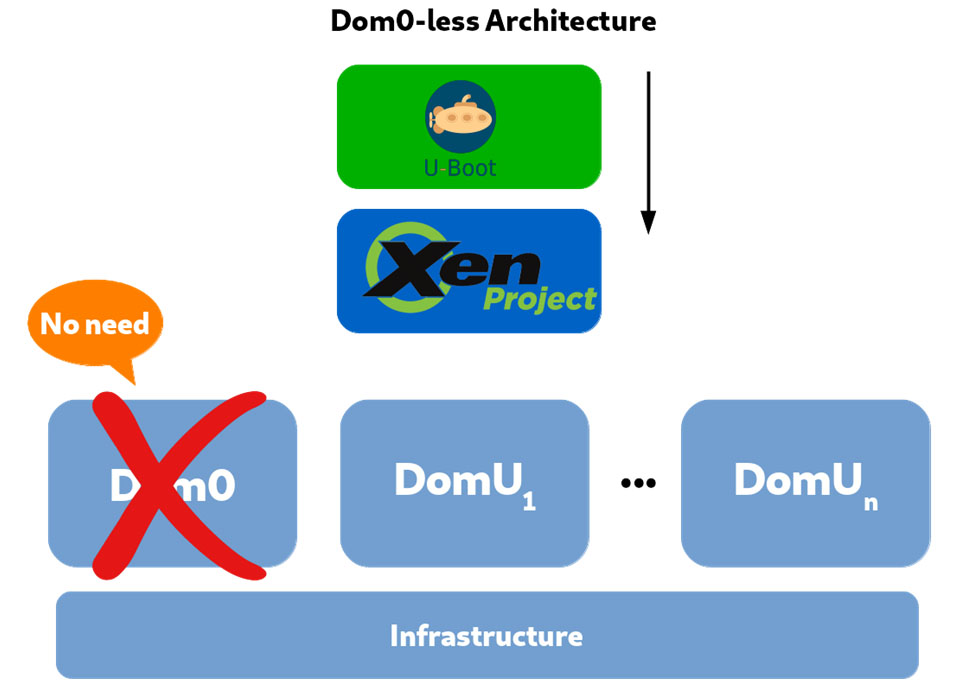
An earlier article in this series described the central role of the privileged domain, Dom0, in Xen. Because the presence of Dom0 adds significant time (measurable in seconds) to the loading of each VM, some embedded system developers have asked for a Dom0-less architecture. Many embedded  systems need to have several VMs up and running in less than a second after the user boots the system. The code to implement a Dom0-less architecture was contributed by Xilinx in 2018. The feature does not yet work with Paravirtualization, but works with other forms of Xen virtualization.

Because there is no privileged process and no userspace tools in a Dom0-less Xen, systems using it must load guests using U-Boot, an open-source boot loader. The guest images must contain all the required binaries, such as operating system kernels and ramdisks. Thus, a new tool named ImageBuilder, whose code is on GitLab, is provided to automate the building of Dom0-less configurations for U-Boot.

Figure 4 shows a Dom0-less architecture.

LPI Exam Prep, LPI Tutorial and Material, LPI Guides, LPI Prep, LPI Certification

Figure 4. Xen running without Dom0

Source: lpi.org
Saturday, 10 October 2020

Xen Virtualization and Cloud Computing #02: How Xen Does the Job

LPI Exam Prep, LPI Tutorial and Material, LPI Guides, LPI Learning, LPI Certification, LPI Cloud Computing

This is the second article in a series. The first introduced virtualization and the Infrastructure as a Service (IaaS). This article explains how Xen uses different types of virtualization to achieve efficient isolation of virtual machines (VMs).

Hardware and operating system support

Xen runs as host on a number of Unix-like systems and GNU/Linux distributions. It is distributed with several Linux distributions by default, including, Debian, Ubuntu, openSUSE, and CentOS. Other GNU/Linux distributions can compile Xen from source code. Other Unix flavors where Xen can be installed as host are FreeBSD, NetBSD, Solaris, and OpenSolaris-based.

Although macOS is a Unix-based operating system, it is proprietary and offers licenses to a limited set of virtualization products. So Xen does not run on macOS.

Operating systems supported as guests on Xen include GNU/Linux, FreeBSD, NetBSD, OpenBSD, MINIX, and Windows OS.

The Xen Project currently supports the x86, AMD64 and ARM architectures, and a port to RISC-V has been started as of the time of writing this article. RISC-V is an open-source architecture with the potential to be an excellent platform for embedded systems, and can support 32-bit, 64-bit and 128-bit words. A RISC-V port will greatly extend the reach and use cases for Xen

Virtualization and paravirtualization

Xen offers five types of virtualization for running the guest operating system:

• PV (Paravirtualization)

• HVM (hardware virtual machine)

• HVM with PV drivers

• PVHVM

• PVH

I’ll briefly describe each type, because we’ll see the implications of their differences later in this article.

Paravirtualization (PV)

Paravirtualization is a concept introduced by Xen Project. It involves rewriting part of the guest operating system, and therefore is also called a modified guest. The new kernel code replaces nonvirtualizable instructions with hypercalls into an application binary interface (ABI). The normal goal of virtualization is to fool the guest OS kernel into thinking it’s running on the real hardware. But in paravirtualization, the guest OS knows that it is running in a virtual machine and cooperates with the hypervisor to get access to the actual hardware. In particular, the hypervisor contains a set of paravirtualized (PV) drivers that the guest loads instead of the actual hardware drivers. The guest OS asks the hypervisor to perform functions that would normally require direct access to hardware: e.g., programming the MMU, accessing certain CPU registers, etc. It is much easier for the hypervisor to translate these calls than to emulate hardware devices and network interfaces to guests.

The result of PV is a very lightweight and fast hypervisor, without the difficulty of providing native OS interfaces. Xen can offer PV even on old CPUs without any support for virtualization.

Hardware-assisted Virtualization (HVM)

In 2005 and 2006, Intel introduced hardware virtualization support for their CPUs, and was shortly followed by AMD. At first, this feature was limited and suffered from low speed. AMD developed the virtual machine capability in its AMD64 CPU family that offered VM instructions under the name AMD-V. Intel provided the same feature under the name VT-x along with another technology called VT-d that allow you to pass through instructions for devices, such as PCI devices, to the guest OS.

Both technologies were invented to solve the performance issues caused by software emulation. Handling these tasks through these CPU extensions improved performance, just as other hardware advances such as network routing and encryption have sped up critical operations. However HVM just simplifies virtualization of the processor, leaving many OS-related features that the hypervisor must virtualize.

HVM, unlike PV, allows for unmodified guests. So proprietary operating systems such as Microsoft Windows can take advantage of HVM’s fast virtualization. In particular, because Microsoft Windows is a closed source OS, it originally could not run on a paravirtualized Xen hypervisor, and had to rely on slower emulation. However, because Windows allows loading of third-party drivers, it is possible now to load drivers that can determine whether the instance of Windows is running on Xen. If so, the Windows system uses paravirtual channels to improve the performance of I/O.

With HVM, Xen uses Qemu emulation for disk and network IO. Regular Paravirtualization does not use Qemu.

HVM with PV drivers

In a fully virtualized system, the interfaces that the hypervisor must provide for the network and disks are complex. Because all modern kernels have ways to load third-party device drivers, the hypervisor can be enhanced with disk and network drivers that use these paravirtualized interfaces. The other name of this technique is full virtualized system with the PV drivers. As you can guess, it is a step toward virtualization with higher performance.

PVHVM

PVHVM (also know as “PV on HVM” or “PV-on-HVM drivers”)  is a mixture of paravirtualization and full hardware virtualization. It's a stepping stone between HVM with PV drivers and PVH. The goal of this technology is to boost performance of fully virtualized HVM guests by including optimized paravirtual device drivers. These drivers bypass Qemu emulation for disk and network IO. They also support CPU functionality like Intel EPT or AMD NPT. The result is much faster disk and network IO performance.

PVH

PVH is a new kind of guest that has been introduced on Xen 4.4 as a DomU, and on Xen 4.5 as

a Dom0. (DomU and Dom0 are described in a later article in this series.) PVH occupies a place between PV and HVM. The guest OS is aware that it is running on Xen and calls the paravirtualized drivers offered by the hypervisor. But some operations still require the Qemu emulator. Specifically the OS is still booted using the hvmloader and firmware that require emulator support.

PVH can be seen as a PV guest that runs inside of an HVM container, or as a PVHVM guest without any emulated devices. It provides the best performance currently possible and calls for fewer resources on the guest OS than pure PV.

The first version of this innovation, PVHv1, did not simplify the operating system. The second version, PVHv2 (also called HVMLite), is a lightweight HVM guest that uses hardware virtualization support for memory and privileged instructions, PV drivers for I/O, and native operating system interfaces for everything else. PVHv2 does not use QEMU for device emulation. In Xen 4.9, PVHv1 has been replaced with PVHv2, which requires guests running Linux 4.11 or a newer kernel.

Comparison of the Xen technologies

Figure 2, from the Xen Project website, shows how each aspect of virtualization is handled by these different technologies.

LPI Exam Prep, LPI Tutorial and Material, LPI Guides, LPI Learning, LPI Certification, LPI Cloud Computing

Figure 2. Differences between Xen Project technologies

Running one VM Inside Another

Some sites want to run one VM inside another, in order to test a variety of hypervisors. Running a hypervisor inside of a virtual machine is called nested virtualization. The main hypervisor that runs on the real hardware is called a level 0 or L0; the hypervisor that runs as a guest on L0 is called level 1 or L1, and finally, a guest that runs on the L1 hypervisor is called a level 2 or L2. This technology has been supported in Xen since version 3.4.

Components of the Xen hypervisor


As explained, Xen is a type-1 hypervisor that runs directly on the hardware and handles all its resources for the guest, including CPU, memory, drivers, timers, and interrupts. After the bootloader, Xen is the first program that runs. Xen then launches each guest.

Just as operating systems commonly separate the root user or superuser from other users, and give the root user special powers and privileges, Xen distinguishes the difference between the host and the guests by defining domains; each domain has access only to the resources and activities allowed to that guest. Each guest runs in a DomU domain, where the U stands for unprivileged. In contrast, a single host operating system runs in a domain called Dom0.

Dom0 is a privileged domain with direct access to the hardware. Dom0 handles all access to the hardware and I/O and manages them on behalf of the users’ VMs. This domain also contains the drivers for all the hardware devices on the system, and tools to manage the Xen hypervisor.

The separation between Dom0 and DomU allows VMs to run and use all system services without privileged access to the hardware or I/O functionality—even though they think they have that access.

Figure 3 shows the Xen hypervisor architecture.

LPI Exam Prep, LPI Tutorial and Material, LPI Guides, LPI Learning, LPI Certification, LPI Cloud Computing

Figure 3. Xen architecture

The system services shown in the Dom0 box of Figure 3 include:

◉ A Toolstack for the Xen administrator. The Toolstack provides a command-line console or a graphical interface for creating, configuring, monitoring, managing, and removing the virtual machines.
◉ Device emulators, which are exposed to the guest OS in each VM. Thus, each guest issues calls and control instructions to the emulator, thinking it is interacting directly with a device.
◉ XenBus, a software abstraction that allows VMs to share configuration information. VMs do this through access to a shared database of configuration information called XenStore,

The standard setup for Dom0 contains the following functions:

◉ Native Device Drivers
◉ System Services
◉ Virtual Device Drivers (backends)
◉ Toolstack

The Toolstack can be a command line console or a graphical interface.It allows a user to manage, create, remove, and configure the virtual machines.

Although Dom0 is normally the hub of Xen virtualization, controlling all other components, we’ll see later in this series that a Dom0-less architecture is possible for specific purposes.

The Xen hypervisor supports three technologies for I/O Virtualization: The PV split driver model, Device Emulation Based I/O, and Passthrough. Explaining these technologies lies beyond the scope of this article. I’ll just say a bit about Passthrough, which gives the VM access to the physical devices. For example, you can use PCI passthrough to give a VM direct access to a NIC, disk controller, HBA, USB controller, sound card, or other PCI device. Passthrough may cause some security problems, and comes with limitations. For example, ancillary operations like save, restore, and migration are not possible.

Tuesday, 6 October 2020

Xen Virtualization and Cloud Computing #01: Introduction

LPI Exam Prep, LPI Learning, LPI Certification, LPI Tutorial and Material, LPI Study Materials, LPI Cloud Computing

The Xen Project is a free and open source hypervisor that enables a computer to run multiple operating systems simultaneously on the same hardware. This article begins a series that covers the way Xen achieves this result efficiently, important features, and ways in which the Xen Project is supporting new advances in virtualization.

Xen forms the key infrastructure for many Internet hosting service companies and cloud providers, which rely on Xen’s secure isolation of users and efficient resource sharing. Private companies also use Xen to divide up resources on their servers among their internal users. Today, big companies such as Amazon, AMD, Bromium, Cisco, Citrix, Google, Intel, Oracle, Samsung, and Verizon are using Xen in products and services including Citrix Hypervisor, XCP-ng, Oracle VM Server, IBM SoftLayer, and Amazon EC2. Qubes OS, a security-focused desktop OS, enforces isolation via the Xen hypervisor.

The Xen Project was started by Ian Pratt at the University of Cambridge and is one of the most successful projects at this university. The first version of Xen was released in 2003. Soon after, Ian Pratt with the help of other Cambridge friends launched the company XenSource Inc to bring Xen to the enterprise market. The company was acquired by Citrix in October 2007, turning the page on a new era for Xen. The Citrix company produced Xen Enterprise 3.0 in August 2006, based on version 3.0.0 of the Xen hypervisor. The company open sourced Citrix XenServer (Citrix Hypervisor) in 2013. Finally, on April 15, 2013, the Linux Foundation included the Xen hypervisor in its umbrella support and named it the Xen Project.

LPI Exam Prep, LPI Learning, LPI Certification, LPI Tutorial and Material, LPI Study Materials, LPI Cloud Computing
Virtualization has gone through several stages in industry acceptance. Before the first VMware offering appeared in 1998, people used virtualization primarily on desktop systems, to do something like running Windows on their Linux box. VMware promoted a new and radically more powerful use case: server consolidation. Before VMware, every server ran on its own physical computer. A single hardware server could run multiple server applications (for instance, a database, a web server, and a mail server), but this reduced performance. VMware promoted the idea of buying one larger computer and running several virtual computers inside of it.

In 2002, there was no hardware support for virtualization (HVM) on x86. The state of the art for virtualization was called "binary translation." This was incredibly complicated, not very fast, and very difficult to get right. There were no competitive open-source implementations, so if you wanted virtualization on x86, an expensive VMWare license was your only option. Traditional virtualization, like VMWare, emulated a real computer. The effect was that you had a piece of software (the operating system) talking to a piece of software (the hypervisor) over an interface designed for hardware.

It was in this environment that Xen was conceived in 2002. The core idea was the concept of paravirtualization, described later in this series.

Virtualization really grabbed the attention of the computer field with Amazon Web Services (AWS). From the beginning, AWS ran on Xen. The business of offering virtualization in the cloud is called Infrastructure as a Service (IaaS).

What is a hypervisor?

IBM invented the hypervisor in the 1960s for its mainframe computers. A hypervisor or virtual machine monitor (VMM) is software or hardware that creates and runs virtual machines. Virtual machines act just like independent, stand-alone processors and appear to be independent processors to the user, but actually share a chip with other virtual machines. Each VM interacts with outside world in its usual way, issuing calls and control instructions to hardware and network devices, memory, and CPUs. But behind the scenes, the hypervisor intercepts all these calls and instructions. The hypervisor carries them out in a way that prevents them from interfering with other VMs, and that respects the resource needs of each VM.

Although the concept of virtual machines has suddenly become popular in the past decade, IBM invented it in the 1960s for its mainframe computers. Nowadays, some hypervisors are embedded into custom devices.

When in use, the hypervisor is called a host machine and each VM managed by this host is called a guest machine. The hypervisor shares the system resources between the VMs while keeping them isolated, so that no user can accidentally or maliciously see or change another user’s data. With the help of the hypervisor, a system can run multiple operating systems at once and use the system resources in an efficient way.

Two types of hypervisor exist, called simply type-1 and type-2. The type-1 hypervisor, also known as native or bare-metal, runs directly on the hardware and control the resources and manage guest VMs. Type-1 hypervisors needs their own drivers to interact with the particular hardware they run on. At the time of writing this article, modern and popular type-1 hypervisors include Xen Project, XCP-ng, Citrix Hypervisor (formerly know as XenServer), Microsoft Hyper-V, and VMware ESXi.

The type-2 hypervisor is a computer program that needs an operating system to work. This program acts as an interface between the operating system and guest VMs, and shares resources between them. The type-2 hypervisor represents each VM as a process to the underlying operating system. Type-2 hypervisors use the drivers supplied by the host OS. At the time of writing this article, popular type-2 hypervisors include Oracle VirtualBox, VMware Workstation Pro and Player, VMware Fusion, Parallels Desktop, FreeBSD bhyve, and KVM.

LPI Exam Prep, LPI Learning, LPI Certification, LPI Tutorial and Material, LPI Study Materials, LPI Cloud Computing

The difference between type-1 and type-2 hypervisors

Type-1 and type-2 hypervisors have different pros and cons:


◉ The pros of type-1 hypervisors lie in performance and security. It offerrs high performance because the hypervisor has direct access to the hardware. Security is also more reliable on type-1 than type-2, because there is no interface between the hypervisor and CPU.
 
◉ The main con of type-1 hypervisors is that GUI management of the VMs requires a separate machine. For example, after installing XCP-ng on a machine, it is is dedicated to XCP-ng and cannot run a shell or desktop alongside it. The result is that you need another machine to connect to XCP-ng and create and manage your VMs. In contrast, many hypervisors like Xen  and Microsoft Hyper-V let you run another operating system next to the hypervisor on the same machine. Xen even allows a parallel desktop environment, which is possible but not recommended with Microsoft Hyper-V because of potential vulnerabilities. All these hypervisors, though, can be managed from the command line.
 
◉ The pro of type-2 hypervisor is simplicity of management. First, you don’t need to install additional software to manage the virtual machines running on type-2 hypervisors. This trait makes type-2 virtualization attractive in development environments. You can run and test on multiple operating systems simultaneously without knowing a lot about virtualization. This does not mean that the type-1 hypervisors are inappropriate for the development environments, just that some users find type-2 hypervisors easier.
 
◉ The cons of type-2 hypervisor spring from its need to run on another operating system to access the hardware resources such as memory, devices, and networking. Thus, performance is inferior to type-1 hypervisors, and security is potentially weaker because an attacker who compromises the host OS can gain access to all the VMs that running on the host.

Why Virtualization?


Virtualization can bring many benefits to your organization and give it new power and capacity. The technology has become widespread and has been extensively discussed in the trade press, but I’ll highlight some of the key benefits that apply to Xen.:

Reduction in costs

Virtualization can reduce the costs of your IT infrastructure. In a non-virtualized environment, each service gets a dedicated physical server. Sharing a computer system among multiple services has a high risk. But today’s hardware is very powerful, so dedicating a server for one service or application just wastes resources. A virtualized environment lets a single physical server uses host many VMs safely. Each of these VMs can run a different operating system and offer different applications. Fewer physical servers mean lower costs, lower energy use, and less physical space.

Reduce downtime and faster recovery

For your customers, nothing is more painful than a service outage. When a disaster affects a physical server, IT staff must scramble to replace or fix it. Depending on the crisis, this could take hours or even days. In a virtualized environment, you can easiluy clone the virtual machines that have been affected in mere minutes.

Creativity

Why waste your IT team’s time on maintaining a lot of physical servers? VMs can be installed, updated, and maintained the with a few clicks. Your IT team can spend their time on other things, such as learning and implementing new technologies.

Control

Virtualization gives you more control over the development process. Consider a new update for an operating system or an application. You want to test this update to ensure that no problem happens. Clone the VM, apply the updates, and test it. If no problem appear, then apply the updates to the main environment.

Help the Earth’s environment

When you cut down on the number of physical servers in your company, it will lead to reduction the amount of power being consumed. Fewer servers allows a smaller carbon footprint and less electronic junk.

Wednesday, 28 November 2018

Limitations and Pitfalls of Cloud Computing

Cloud computing companies have become commonplace. Business people recognize that cloud-based software and services make it possible to use computing resources more efficiently. Large capacity servers in massive server farms can run applications and services and provide good performance. The cloud isn’t scary anymore and everyone uses it.

LPI Study Material, LPI Tutorial and Material, LPI Guides, LPI Certification

Even so, cloud services have their limitations and pitfalls.

For example, some applications, unless heavily modified, do not do well with high latency. Other applications may have huge network requirements which do not fit “cloud” models well. Applications where the computation is far distant from the data can have excessive communication costs and long latencies.

Consider the case of an application developed to use artificial intelligence to recognize people on a bus. A web cam was placed at the front of the bus and the application tracked people entering and leaving the bus and therefore could calculate the number of seats that were empty.

The application was modeled two ways. The first had the entire application living in the cloud with data streaming from the webcam on the bus into the remote application. They built the second model using a small single-board computer running the program on the bus itself. While it communicated with the cloud, it only did so when there were no more seats available or when seats became available after someone left the bus.

Estimates of both approaches showed that in network savings alone, installing the small computer paid for itself in one day. In addition, interruptions in network traffic due to the roaming issues of the bus were not as frequent. Multiply this by a fleet of buses and you see real savings.

“Big Cloud” vendors are now reaching out with new IoT (Internet of Things) solutions, while avoiding discussions about the amount of Internet traffic, latencies, lack of control, and potential security problems that may come from this offering.

Even with common and established cloud applications, issues such as multi-country jurisdiction, not being able to guarantee privacy, lack of servers in more than two-hundred countries, lack of control on where data is stored and where processes are run, are all factors in what data processing you allow into the cloud.

An alternative approach is to create private clouds to do the initial processing of IoT data in such a way as to limit transport and exposure.

Peer-to-Peer cloud software

Peer-to-Peer cloud software allows systems administrators to set up their own cloud among the different computers or servers processing the data and the “Things” supplying that data. If the Things have even the tiniest networking capability, they could become a legitimate part of the cloud and allow any application that could authenticate to them access the Thing.

This would help keep the network traffic and processing local to the Things, thereby reducing the networking costs and often improving latency time in processing the raw data.

Ideally, this cloud software would be Open Source. Many pundits are anxious about Things being used to help spread viruses, aiding in denial of service attacks and other dastardly goings-on. Making sure the Thing software is Open Source means that the source code is available to fix the inevitable problems of rampant Things far into the future. Of course, all software and networking the Thing uses should also include good encryption and authorization.

Other uses of peer-to-peer cloud software

While peer-to-peer cloud software is exceptional for IoT, it is also useful in client/server cloud functions. By setting up clouds internal to your own organization or community, you make more efficient use of existing hardware. Using peer-to-peer clouds in conjunction with Big Cloud vendors can reduce the costs of the cloud software overall. This is called a hybrid cloud.

Now add to this the ability to actually buy, rent, and sell additional resources that you may have or need as the situation warrants, all done automatically once the criteria for exchange has been set up.

Cloud providers often have Service Level Agreements (SLA) that state what level of performance you will get from the resource provider. These include, but are not limited to, the percentage of time will your resources be available (often measured in “nines”, e.g. 99.999%), the type of security provided, and whether data is backed up and when, etc. These are all things that people look for when choosing a provider.

Likewise, accompanying contracts state how much the services cost and what happens if the SLA is not met.

Standardize these things, make the system electronic, and use some form of electronic currency, and the systems can automatically find the resources needed and balance for the best possible fit. This frees up the purchaser from having to constantly evaluate what supplier is going to provide the resources for their cloud needs.